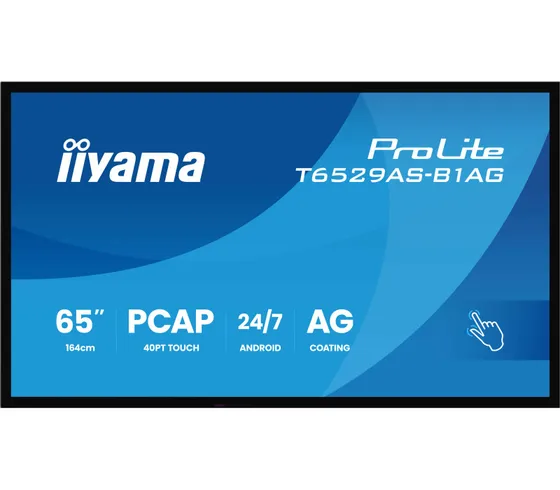
iiyama 65″ touchscreen monitor
Brand: iiyamaModel: T6529AS-B1AG
BlackMultiTouch
View details →
unitsunits


Turn an ordinary presentation into an interactive meeting with your brand. The 75-inch iiyama ProLite TN7505A-B1AG touchscreen monitor presents products, designs and multimedia content on a large 4K UHD screen, encouraging audiences to explore the details independently. Precise DeepContrast-IR+ technology makes browsing catalogues, selecting product variants and using prepared applications feel natural directly on the screen surface.
The 75″ format works extremely well on exhibition stands, in presentation areas, and at conferences and business meetings. It provides ample space for content while allowing an interactive station to be created where the largest monitors would be harder to integrate into the stand. You can use the screen for both individual customer conversations and presentations to a small group.
The iiyama TN7505A-B1AG has no built-in operating system, giving you the freedom to choose the computer, applications and content management method. You can use company software, a specialist configurator or a presentation prepared for a specific event. A 4K UHD image, anti-glare coating, precise touch and USB-C support for image, data and laptop charging combine an attractive display with convenient professional operation.
01 / FEATURES AND APPLICATIONS
At a trade show, what you show is not the only thing that matters. How visitors can explore your offer is equally important. A touchscreen monitor for an exhibition stand creates a presentation where customers select products that interest them, discover their features and browse available variants.
The 75-inch touchscreen provides enough space for detailed photographs, 3D visualisations and extensive catalogues, while fitting well into stations designed for direct sales conversations. Visitors can use the prepared content comfortably without browsing printed catalogues.
In the interior design industry, the monitor can present different product finishes and configurations. On industrial exhibition stands, it can be used to browse visual documentation, machinery models and installation diagrams. At product launches, it can present product features as an interactive demonstration.
Hiring a 75-inch touchscreen monitor works especially well when you want to combine an attractive display with personal visitor support. The screen becomes a tool for the sales representative, who can hold a conversation while showing the customer the solutions that interest them.
At conferences and workshops, direct interaction with the displayed content helps maintain attendee attention. The iiyama 75-inch touchscreen monitor allows the presenter to highlight important information, discuss charts and work with documents on a large image surface.
In conference rooms, the screen can present plans, schedules, analyses and content prepared by speakers. 4K UHD resolution makes detailed content easier to display, while multi-touch technology supports applications that allow notes and comments to be added.
During training sessions and team meetings, the monitor can serve as an interactive whiteboard. Attendees can analyse designs, compare solutions and develop ideas together using suitable software running on the connected computer.
A 75″ touchscreen monitor for a conference room is a good choice for meetings where the presenter needs convenient access to the entire screen surface while the other attendees should be able to see the discussed content clearly.
An engaging presentation requires a clear image, especially when the screen shows fine graphics, diagrams or detailed visualisations. The iiyama TN7505A-B1AG uses an IPS panel with a resolution of 3840 × 2160 pixels, providing high detail and wide viewing angles.
Display brightness of up to 450 cd/m² and the AG anti-glare coating help reduce the effect of reflections when working in well-lit rooms. The monitor is therefore suitable for both exhibition spaces and meeting rooms where lighting cannot always be fully controlled.
Optical Bonding technology reduces the optical distance between the touch surface and displayed image. Combined with DeepContrast-IR+, it provides precise selection of interface elements and convenient use of interactive applications. Touch accuracy is ±1 mm.
The monitor supports up to 40 touch points and features Palm Rejection, reducing unintended responses when a hand rests on the screen. This makes complex interfaces, note-taking and collaborative work by several people with compatible software easier.
In many event projects, the ability to use software the company already has is most important. Dedicated configurators, sales applications and presentation systems often require a specific operating environment and access to company data.
A touchscreen monitor without Android, such as the iiyama TN7505A-B1AG, allows the entire presentation to run on your selected computer. You can use your own operating system, applications and IT security policies without moving content into an environment built into the monitor.
This solution works particularly well during meetings with corporate customers, presentations of technology solutions and events where confidential content or specialist applications are used.
HDMI, DisplayPort, VGA and USB-C inputs are available. A single compatible USB-C connection can carry image, data and the touch signal while charging a laptop at up to 65 W. The OPS slot supports a suitable computer module without requiring a separate unit at the station.
Not every exhibition stand needs the largest available screen. In many projects, it is more important to create a station where visitors can stop comfortably, begin a conversation and explore the offer independently.
The large-format 75″ touchscreen monitor creates this space without overwhelming the other display elements. It can be used in a separate presentation area, at a consultation station or as the centrepiece of an interactive product catalogue.
A touchscreen monitor for product presentations also works well at promotional events and distributor meetings, where attendees need access to detailed information, comparisons and technical content. PiP and PbP functions can additionally display images from two sources at the same time.
At CMP, we help adapt the screen size, mounting method and connection configuration to the event. If your project requires a different format, explore our range of touchscreen monitors, which includes devices in various sizes.
02 / TECHNICAL SPECIFICATIONS
| Manufacturer | iiyama |
|---|---|
| Series | ProLite |
| Model | TN7505A-B1AG |
| Device type | Large-format touchscreen monitor without a built-in operating system |
| Nominal screen size | 75″ |
| Actual screen size | 74.52″ / 189.273 cm |
| Panel technology | IPS LCD |
| Resolution | 3840 × 2160 px — 4K UHD |
| Aspect ratio | 16:9 |
| Panel brightness | 500 cd/m² |
| Display brightness | Up to 450 cd/m² |
| Static contrast ratio | 1200:1 |
| Panel response time | 8 ms GTG |
| Viewing angles | 178° / 178° |
| Active display area | 1650 × 928 mm |
| Pixel pitch | 0.4296 mm |
| Touch technology | DeepContrast-IR+ |
| Touch points | 40 |
| Touch accuracy | ±1 mm |
| Touch response time | 5 ms |
| Touch interface | USB |
| Palm Rejection | Yes |
| Screen coating | AG anti-glare and antibacterial coating |
| Touch glass | Optical Bonding, Anti-Glare, Anti-Gloss |
| Operating system | No built-in operating system |
| Compatible operating systems | Windows, Linux |
| HDMI inputs | 2 × HDMI (CEC/ARC) |
| DisplayPort | 1 × DisplayPort |
| USB-C | 1 × USB-C — DisplayPort Alt Mode, data, touch and 65 W Power Delivery |
| USB Touch | USB-B — touch control when an external computer is connected |
| VGA | 1 × VGA (Full HD) |
| USB-A ports | 2 × USB 3.2 Gen 1, 1 × USB 2.0 |
| Audio input | 3.5 mm mini-jack |
| Audio output | 3.5 mm mini-jack |
| Wired network | 2 × RJ45 (in/out) |
| Control | RS-232C / LAN |
| OPS | Intel OPS80 slot |
| PiP — picture-in-picture | Yes |
| PbP — picture-by-picture | Yes |
| Built-in speakers | 2 × 20 W |
| Subwoofer | 1 × 20 W |
| Fanless design | Yes |
| Operating orientation | Landscape only |
| VESA mounting pattern | 800 × 400 mm |
| Monitor dimensions | 1710.2 × 1036.3 × 120.4 mm |
| Monitor weight | 54.5 kg |
| Power consumption | 175 W typical |
| Operating temperature | 0–40°C |
| Energy efficiency class | G |
| Housing colour | Black |
03 / CONFIGURATION AND INSTALLATION
A 75-inch touchscreen monitor creates a large interactive station while providing greater layout flexibility than 86″ and 98″ screens. It works both as a standalone presentation station and within an exhibition stand prepared by the stand builder.
The TN7505A-B1AG weighs 54.5 kg and uses a VESA 800 × 400 mm mount. We select suitable stands, mounts or structures for installation, taking into account the device's weight, mounting stability and user access to the touch surface.
When preparing the station, we determine the installation height, computer location, cable routing and access to connections. The monitor is designed exclusively for landscape orientation, so we do not use it in portrait installations or as a horizontal touch table.
The iiyama TN7505A-B1AG works with an external computer that runs presentations, interactive catalogues and specialist applications.
The USB-C connection carries image, data and the touch signal while charging a compatible laptop at up to 65 W. With a suitably equipped computer, this provides a convenient station with fewer cables.
When the image is transmitted through HDMI, DisplayPort or VGA, an additional USB Touch connection is required for touch control. We select the connection method to suit the customer's equipment.
Within the agreed scope of technical support, we can prepare the connections and test how the devices work with the application before the event begins.
Without a built-in operating system, the monitor's working environment depends on the connected computer. This is beneficial for exhibitors and organisers who use their own applications and want to retain control over how they are run.
The monitor can work with a laptop, desktop computer or compatible OPS module. This allows the station to be adapted to both straightforward presentations and more demanding product configurators or interactive applications.
The choice of computer depends on the software requirements, presentation control method and content used during the event.
For company applications, it is worth checking the operating system, image resolution and touch support requirements in advance so that the correct configuration can be prepared.
A well-designed application makes much more effective use of a large touchscreen than simply transferring laptop content to a larger surface.
When preparing content, account for the 4K UHD resolution, suitable button sizes and clear navigation. Visitors should be able to find the information they need easily and move freely between successive parts of the presentation.
On an exhibition stand, the monitor's location in relation to walkways, counters and other stand elements also matters. In conference rooms, visibility for attendees, presenter position and convenient access to the screen are important.
PiP and PbP functions allow two image sources to be displayed simultaneously, which can be useful when comparing content, discussing designs or delivering presentations from several computers.
We tailor the scope of work to the organiser's requirements, available infrastructure and the way the device will be used.
We offer touchscreen monitor rental with collection from the CMP warehouse in Piła, rental with delivery and collection, and touchscreen monitor rental with installation and technical support within the agreed scope.
We can provide transport, mounting, installation, computer connection and launch of the presentation station. If the project includes several monitors or additional AV equipment, we agree the equipment scope according to the specific event requirements.
Customers with their own technical crew can also hire the equipment for independent production. When preparing the quotation, we account for the date, location, rental period and required accessories.
04 / QUESTIONS AND ANSWERS
The monitor is ideal for trade shows, conferences, workshops, product presentations and business meetings. It can create an interactive station for presenting catalogues, designs and multimedia applications.
Yes. DeepContrast-IR+ technology supports up to 40 touch points, allowing several people to use compatible applications simultaneously.
No. The model has no built-in operating system. A connected computer or compatible OPS module is required to run applications.
It allows you to use your own software and computer while retaining control over the operating system, applications and company IT security policies.
Yes. The device has HDMI, DisplayPort and USB-C. With a compatible laptop, USB-C can support image, touch and charging at up to 65 W.
No. The TN7505A-B1AG has no built-in Wi-Fi or Bluetooth modules. These functions can be provided through a suitably equipped computer or OPS module.
Yes, with a suitable computer or external wireless display system. The monitor itself does not provide a built-in wireless presentation-sharing system.
No. The monitor is designed exclusively for standard landscape orientation. This model must not be installed vertically, upside down or used as a horizontal touch table.
Yes. The monitor uses a VESA 800 × 400 mm mount. The stand or mount must be selected for its dimensions and weight of 54.5 kg.
Yes. With a suitable computer connected, the monitor can run interactive configurators, catalogues, 3D visualisations and other applications prepared for the exhibitor.
Yes. The screen has an AG coating that reduces light reflections, as well as Optical Bonding technology and an antibacterial coating.
Yes. PiP and PbP functions allow images from two suitably connected sources to be displayed simultaneously.
Yes. The function reduces unintended screen responses when a hand rests on the touch surface, making note-taking and application use easier.
Yes. The device has two 20 W speakers and a 20 W subwoofer. Additional sound reinforcement can be used for larger events.
We agree the rental scope individually. Depending on the project requirements, we can include a suitable stand, computer and necessary accessories.
The rental price depends on the rental period, event location, transport method, selected mount, and the scope of additional equipment, installation and technical support.
Send us the event date and location, planned use of the monitor, and whether you need a stand, computer and technical support. If the screen will run a dedicated application, provide its requirements so that we can prepare the configuration correctly.
Send us your plans, sample content or an early idea. Our specialists will help you choose suitable equipment and plan how to use it.
Ask for help choosing equipment
09 / CONTACT
Planning an event or looking to rent equipment? Get in touch and tell us what you need. We help you choose a setup that suits your project, the available space and your budget. We prepare proposals for full technical event production and quotations for AV equipment rental.Send us your brief and any dates and locations already confirmed. You can also start with a general idea. Together we will work out the details we need to prepare a proposal. Call, email or use the enquiry form.
10 / COMPANY DETAILS
ul. Jana Styki 3
64-920 Piła, Poland
NIP: 7642722129
KRS: 0001128230
REGON: 529696130
District Court Poznań – Nowe Miasto and Wilda in Poznań
IX Commercial Division of the National Court Register