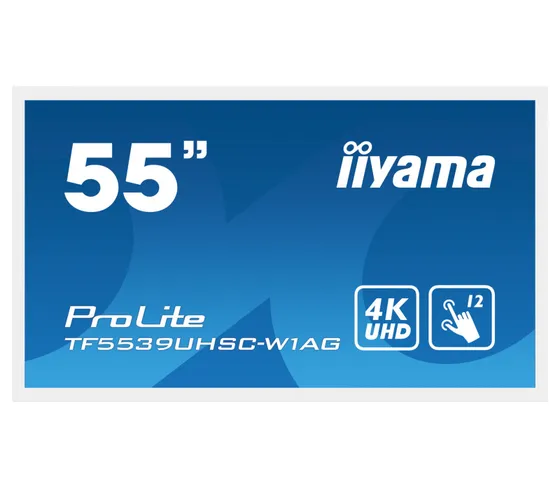
White iiyama 55″ touchscreen monitor
Brand: iiyamaModel: TF5539UHSC-W1AG
WhiteMultiTouch
View details →
unitsunits


Create an interactive display that attracts attention and encourages customers to explore your offer independently. The black 55-inch iiyama ProLite TF5539AS-B1AG touchscreen monitor combines a detailed 4K UHD image with precise PCAP capacitive technology for intuitive operation of catalogues, configurators and multimedia applications. The elegant glass screen surface and matt black housing integrate neatly with modern exhibition stands, creating an attractive presentation station.
The open-frame design provides exceptional freedom in how the monitor is used. You can install it vertically or horizontally, integrate it into a display wall or counter, or even create an interactive touch table. Touch Through-Glass technology supports operation through an additional glass panel up to 6 mm thick, allowing the monitor to be integrated into bespoke set design or a protected display. It is an excellent solution for trade shows, product launches, promotional events and interactive attendee areas.
The built-in Android 11 system runs compatible applications directly on the monitor without a separate computer. Support for 40 touch points, 24/7 operation and content management tools make it possible to create both a station for individual presentations and a self-service information point. You can therefore use the monitor wherever audience interaction with the presented product matters most.
01 / FEATURES AND APPLICATIONS
A well-designed exhibition stand allows visitors not only to see products, but also to explore their capabilities independently. The iiyama 55-inch touchscreen monitor creates an interactive station where customers can browse the offer, compare variants and discover details of the solutions that interest them.
The open-frame design makes it easier to integrate the device into a bespoke structure. The monitor can be built into a display wall, consultation station or suitably prepared counter while maintaining a coherent overall appearance. The matt black housing works well with dark set elements and helps the displayed content stand out.
On stands for furniture manufacturers, the monitor can present collections, materials and finishes. In the automotive industry, it can run vehicle configurators, while at industrial trade shows it makes machinery models, installation diagrams and technology animations easier to present.
Touchscreen monitor rental for trade shows creates a station that supports sales teams, engages visitors and presents far more information than a conventional display can hold. Everything is tailored to the specific product, audience and type of event.
One of the greatest advantages of the TF5539AS-B1AG is support for three orientations. The monitor can operate in landscape, portrait and face-up orientation, providing extensive options for interactive station layouts.
Portrait installation is ideal for touchscreen kiosks, information points and product catalogues. In this orientation, the screen can present an event map, conference schedule, exhibitor information or an application that visitors navigate independently.
In landscape orientation, the monitor provides a convenient space for presenting visualisations, documentation and configurators. It can also form part of a station where a sales representative and customer analyse product possibilities and compare available solutions together.
Face-up installation creates an interactive touch table that attendees can use from several sides. This works especially well for architectural design presentations, interactive maps, property development presentations and educational displays. This configuration requires correct device cooling and ventilation of the structure.
For displays accessible to many attendees, both an attractive presentation and suitable device protection are important. The iiyama TF5539AS-B1AG uses Touch Through-Glass technology, which enables touch operation through an additional glass panel up to 6 mm thick.
The monitor can therefore be placed behind a suitably selected glass surface while retaining interaction with the displayed content. This provides greater freedom when designing stands, particularly when the screen needs to be integrated into bespoke set design, a product display or a self-service station.
The front of the monitor has an IP65 protection rating, providing resistance to dust and water jets within the limits defined for this class. This is an important advantage in areas used intensively by visitors. Protection applies only to the front surface, so the structure must suitably protect the other parts of the device.
The monitor also features 4 mm glass with a 7H hardness rating. Combined with the metal housing, this creates a design suited to professional installations where durability, appearance and convenient day-to-day operation matter.
An interactive presentation should look equally attractive up close and from a greater distance. The iiyama TF5539AS-B1AG displays an image at 3840 × 2160 pixels, providing high detail in photographs, 3D visualisations and complex application interfaces.
The IPS panel provides wide 178° viewing angles, keeping the image clear for people standing to the side of the station. Brightness of 435 cd/m² with the touch panel and the AG anti-glare coating help reduce reflections during presentations in illuminated interiors.
Bonded PCAP technology provides intuitive operation with a finger, stylus or compatible latex gloves. Touch accuracy is ±2.5 mm, making it easier to select interface elements, enlarge details and use interactive configurators.
The monitor supports up to 40 touch points, allowing several people to work with a suitably prepared application at the same time. Palm Rejection reduces unintended responses when a hand rests on the screen, improving comfort when using interactive presentations and project stations.
An interactive exhibition station can operate without a computer, giving visitors continuous access to prepared content. The iiyama TF5539AS-B1AG has Android 11, which can run compatible applications and present content directly on the device.
The built-in iiSignage² platform supports management of screen content, while the EShare application enables wireless content sharing from compatible devices when a suitable network connection is provided. FailOver can configure automatic signal source switching, which is useful during long-running presentations.
Kiosk mode allows the monitor's operation to be adapted to the selected application or station function. This makes it possible to prepare an interactive catalogue, information system or presentation where visitors navigate a suitably designed interface independently.
The model is designed for 24/7 operation, making it suitable for multi-day events and long-running displays. At CMP, we help adapt the installation, connections and use of the device to the project. If you need a different screen size or design, explore our range of touchscreen monitors.
02 / TECHNICAL SPECIFICATIONS
| Manufacturer | iiyama |
|---|---|
| Series | ProLite |
| Model | TF5539AS-B1AG |
| Colour | Black, matt |
| Device type | Open-frame touchscreen monitor with Android |
| Nominal screen size | 55″ |
| Actual screen size | 54.6″ / 139 cm |
| Panel technology | IPS LED |
| Resolution | 3840 × 2160 px — 4K UHD |
| Refresh rate | 60 Hz |
| Aspect ratio | 16:9 |
| Panel brightness | 500 cd/m² |
| Brightness with touch panel | 435 cd/m² |
| Static contrast ratio | 1200:1 |
| Panel response time | 8 ms GTG |
| Viewing angles | 178° / 178° |
| Active display area | 1209.6 × 680.4 mm |
| Pixel pitch | 0.315 mm |
| Number of colours | 1.07 billion |
| Touch technology | Bonded PCAP |
| Touch points | 40 |
| Touch accuracy | ±2.5 mm |
| Touch input | Finger, stylus, latex gloves |
| Touch interface | USB |
| Touch input through additional glass | Up to 6 mm |
| Palm Rejection | Yes |
| Protective glass | 4 mm |
| Glass hardness | 7H |
| Screen coating | Anti-glare AG, matt |
| Front protection | IP65 |
| Structure | Open-frame design, edge-to-edge glass |
| Enclosure | Metal |
| Operating system | Android 11 |
| Processor | 4 × Cortex-A73 + 4 × Cortex-A53 |
| Graphic layout | Mali-G52 MP8 |
| RAM | 4 GB |
| Internal storage | 32 GB |
| Built-in software | iiSignage², EShare, FailOver |
| Kiosk mode | Yes |
| Image retention protection | Yes |
| HDMI inputs | 2 × HDMI 2.0 — 4K 60 Hz |
| DisplayPort | 1 × DisplayPort 1.2 — 4K 60 Hz |
| USB-A ports | 2 × USB 2.0 |
| USB for touch control from a computer | 1 × USB-B |
| Wired network | 1 × RJ45 LAN |
| Control | RS-232C / LAN |
| Audio output | 3.5 mm mini-jack |
| Speakers | 2 × 10 W |
| HDCP | 2.2 |
| Operating orientation | Landscape, portrait, face up |
| Operating mode | 24/7 |
| Cooling | Fan; required in face-up mode |
| VESA mounting pattern | 400 × 400 mm |
| Mini PC mount | VESA 100 × 100 mm |
| Monitor dimensions | 1274 × 744.8 × 65.2 mm |
| Monitor weight | 39.6 kg |
| Power consumption | 139 W typical |
| Standby mode | 0.5 W |
| Operating temperature | 0–40°C |
| Housing colour | Black, matt |
03 / CONFIGURATION AND INSTALLATION
The open-frame design allows the iiyama 55″ monitor to form an integral part of an exhibition stand. The device can be installed in a suitably prepared display wall, counter or custom structure, creating a neat connection between the screen and surrounding stand.
The TF5539AS-B1AG weighs 39.6 kg and uses a VESA 400 × 400 mm mount. When selecting the structure, we account for the device's weight, how it will be used and the loads created by interaction with the touch surface.
When preparing the design, we work with the stand builder to agree the installation opening dimensions, access to connections and power, and the technical space. Correct preparation of these elements makes installation easier and provides convenient service access.
The monitor can operate in landscape or portrait orientation, allowing the application layout to be adapted to the stand design and how products are presented.
Support for face-up operation allows the TF5539AS-B1AG to create interactive display tables. This configuration is especially useful for plans, maps, spatial visualisations and content that attendees want to analyse together.
When designing the table, suitable structural rigidity, secure mounting and a comfortable screen height must be provided. The layout of other stand elements is also important so that users can approach the station freely.
In face-up orientation, the monitor's fan function must be enabled. If the device is enclosed within a table housing, additional cooling and correct airflow must be provided inside the structure.
With this installation method, it is also particularly important to prepare the application correctly so that content can be used comfortably from different sides of the station.
Touch Through-Glass technology allows the monitor to be used behind an additional glass panel up to 6 mm thick. This is useful for custom display stations where the screen needs to be integrated into a uniform stand surface.
When designing the installation, the glass, its mounting method and distance from the monitor surface must be selected correctly to maintain proper touch operation. Construction details require agreement with the stand builder.
IP65 front protection increases the screen surface's resistance in areas used intensively by visitors. It does not replace protection for the rear of the device, connections and electrical installation.
A correctly designed structure creates a neat result while maintaining convenient operation, technical access and suitable working conditions for the monitor.
The built-in Android 11 system allows you to prepare a standalone interactive station with compatible applications, product catalogues and multimedia content. Not every production therefore requires a separate computer.
If the project uses specialist software, the monitor can be connected to an external computer through HDMI or DisplayPort. Touch functionality then requires an additional USB connection between the monitor and computer.
Two HDMI inputs and DisplayPort support a range of signal sources. The LAN port and RS-232C interface also allow the monitor to be included in more advanced technical configurations.
When preparing the station, we agree how the application will be launched, the required connections and content availability. With complete technical event production, we can test the configuration before the event begins.
We tailor the scope of work to how the monitor will be used, the station structure and the requirements of the specific event.
We offer touchscreen monitor rental with collection from the CMP warehouse in Piła, rental with delivery and collection, and rental with installation and technical support within the agreed scope.
We can provide transport, suitable mounting, monitor installation, device connection and launch of the presentation station. For projects requiring integration into an exhibition stand, we work with the stand builder to adapt the solution to the prepared structure.
Customers with their own technical crew can also hire the device for independent production. The quotation accounts for the date, location, rental period, installation method and required equipment.
04 / QUESTIONS AND ANSWERS
The monitor is ideal for trade shows, product launches, promotional events, conferences and interactive displays. It can serve as a product catalogue, information point, integrated stand element or interactive table.
Yes. The model supports landscape and portrait orientation, so it can be used as a conventional presentation display or vertical touchscreen kiosk.
Yes. The TF5539AS-B1AG supports face-up installation. In this configuration, the fan must be enabled and suitable cooling provided within the structure.
Yes. Touch Through-Glass technology retains touch functionality through an additional glass panel up to 6 mm thick, provided the installation is prepared correctly.
Yes. The device has Android 11, allowing compatible applications and prepared content to be used without connecting an external computer.
Yes. The monitor can display content independently and run compatible applications in Android 11.
Yes. The monitor supports up to 40 touch points, allowing several people to use a suitably prepared application at the same time.
The front of the device has an IP65 protection rating. The protection does not cover the entire monitor, so the rear, connections and electrical installation require suitable protection.
Yes. It can run catalogues, visualisations and configurators in a compatible Android environment or on a connected computer.
Yes. Capacitive technology allows the screen to be used with a finger, stylus or compatible latex gloves.
Yes. The monitor has two HDMI inputs and DisplayPort. An additional USB connection is required for touch control from an external computer.
No. The TF5539AS-B1AG uses HDMI and DisplayPort inputs, as well as USB connections for touch control and peripheral devices.
Yes. The device is designed for 24/7 operation when the required installation and cooling conditions are maintained.
Yes. The monitor has two 10 W speakers. Separate sound reinforcement can be used for larger events.
The rental scope is agreed individually. Depending on the project requirements, we can provide suitable mounting, transport, installation and agreed technical support.
The rental price depends on the rental period, event location, installation method, required accessories, and the scope of transport and technical support.
Send us the event date and location and tell us whether the monitor will be installed vertically, horizontally, integrated into a structure or used as a touch table. If you plan to use a dedicated application or additional glass panel, describe the station requirements so that we can select the configuration correctly.
Send us your plans, sample content or an early idea. Our specialists will help you choose suitable equipment and plan how to use it.
Ask for help choosing equipment
09 / CONTACT
Planning an event or looking to rent equipment? Get in touch and tell us what you need. We help you choose a setup that suits your project, the available space and your budget. We prepare proposals for full technical event production and quotations for AV equipment rental.Send us your brief and any dates and locations already confirmed. You can also start with a general idea. Together we will work out the details we need to prepare a proposal. Call, email or use the enquiry form.
10 / COMPANY DETAILS
ul. Jana Styki 3
64-920 Piła, Poland
NIP: 7642722129
KRS: 0001128230
REGON: 529696130
District Court Poznań – Nowe Miasto and Wilda in Poznań
IX Commercial Division of the National Court Register