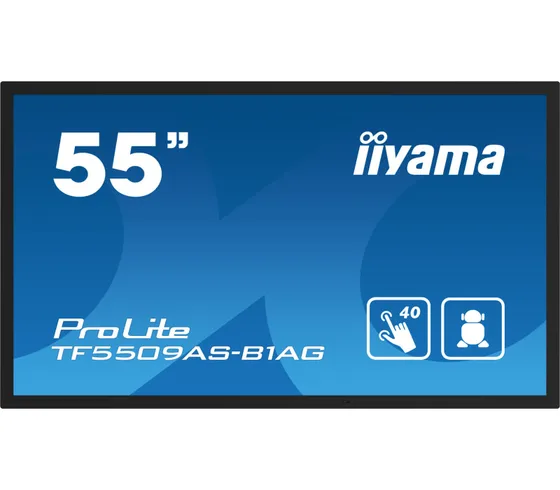
iiyama 55″ touchscreen monitor
Brand: iiyamaModel: TF5539AS-B1AG
BlackMultiTouch
View details →
unitsunits


Create an interactive display that fits your exhibition stand and invites visitors to explore your offer. The white 55-inch iiyama ProLite TF5539UHSC-W1AG touchscreen monitor combines detailed 4K UHD images with precise touch control, making it easy for customers to browse catalogues, explore products and use your applications.
The matt white housing and open-frame design fit neatly into light-coloured exhibition stands, display furniture and stage sets. Install the monitor in portrait, landscape or face-up orientation to create an interactive kiosk, presentation station or touch table. Touch input works through an additional glass panel up to 6 mm thick, giving you more freedom when designing a custom display.
The monitor connects to an external computer, so you can use your own applications, company configurators and presentation systems. Capacitive technology with 15 touch points, an IPS panel and 24/7 operation suit professional installations where appearance, ease of use and flexibility in the station design matter.
01 / FEATURES AND APPLICATIONS
At a trade show, the appearance of the stand shapes how visitors see your brand. The white 55-inch touchscreen monitor fits into a light-coloured stand and provides an attractive interactive display for products, multimedia and catalogues.
The open-frame design makes it easy to integrate the monitor into a suitably prepared wall, counter or bespoke display unit. Its matt white housing blends with pale surfaces, so the screen becomes part of the design without needing a separate unit in front of the stand.
At furniture and interiors exhibitions, visitors can browse collections, compare colours and select product variants. Technology manufacturers can use the monitor to show equipment models, detailed visualisations and configurators. It also suits product launches where a physical exhibit is supported by additional information.
Hiring a white touchscreen monitor for a trade show lets you design a station that reflects your brand and the way your sales team works. Customers can explore the offer for themselves, while sales staff can show more options than a printed catalogue allows.
The TF5539UHSC-W1AG supports three orientations. Install it in landscape, portrait or face-up orientation to suit the design of the station and the way visitors move around it.
The 55″ touchscreen in portrait orientation works well as an information kiosk, product catalogue or part of an entrance display. It can show conference schedules, event plans, exhibitor information and applications that let visitors find the content they need.
Landscape mounting provides room for visualisations, documentation and configurators. At a consultation station, a sales representative and customer can select product variants, explore features and review the details of a project together.
A face-up installation creates an interactive touch table for investment plans, architectural designs, interactive maps and educational content. In this configuration, the monitor’s fan must be switched on and the enclosure must provide adequate cooling.
An additional protective surface gives designers more freedom with custom enclosures. The iiyama TF5539UHSC-W1AG supports Touch Through-Glass, allowing touch input through an additional glass panel up to 6 mm thick.
The screen can sit within a continuous furniture surface, an information point or a protected exhibit. This is particularly useful when you want a clean finish and visitors need to explore the content themselves.
The front of the monitor is rated IP54. This rating applies to the front surface, so the rest of the unit, its connectors and the electrical installation need suitable operating conditions. The metal housing and 4 mm protective glass with a hardness rating of 7H add durability to a professional installation.
A well-designed enclosure combines a clean finish with ease of use. We consider glass mounting, structural stability, connector access and cooling so the monitor operates correctly in the chosen configuration.
An interactive display should make it easy to navigate content and see product details. The white iiyama 55″ monitor has a 3840 × 2160 pixel IPS panel, giving visitors a detailed image on a screen sized for direct touch interaction.
Wide 178° viewing angles help visitors see the content from the side of the station. Panel brightness of 500 cd/m² and the AG anti-glare coating help keep presentations legible in well-lit rooms, even when the screen is surrounded by other displays.
PCAP capacitive touch technology works with a finger, a stylus or compatible latex gloves. Touch accuracy is ±3 mm, making it easy to select buttons, browse expandable catalogues and use applications designed for a large interactive surface.
The monitor supports up to 15 touch points, allowing several people to work together when the software supports it. Palm Rejection helps prevent unintended input when a hand rests on the screen, making presentations and design workstations more comfortable to use.
Professional exhibitions often use custom applications, product configurators and presentation systems developed for a particular brand. The TF5539UHSC-W1AG connects to an external computer so you can run software tailored to your event.
Without built-in Android, the operating environment is determined by the connected device. You can use your own computer, operating system, company applications and IT setup, keeping control over your data and the way you present your content.
HDMI, DisplayPort and VGA inputs let you connect a range of video sources. For touch input from an external computer, you also need a USB connection. Your chosen software then controls the interactive display.
The model is designed for 24/7 operation, making it suitable for information points and multi-day exhibitions. CMP can help you choose the mounting arrangement, connections and configuration for your project. For other sizes or designs, explore our touchscreen monitors.
02 / TECHNICAL SPECIFICATIONS
| Manufacturer | iiyama |
|---|---|
| Series | ProLite |
| Model | TF5539UHSC-W1AG |
| Housing colour | Matt white |
| Device type | Open-frame touchscreen monitor |
| Screen size | 55″ / 139 cm |
| Panel technology | IPS LED |
| Resolution | 3840 × 2160 px — 4K UHD |
| Refresh rate | 60 Hz |
| Aspect ratio | 16:9 |
| Panel brightness | 500 cd/m² |
| Light transmission | 84% |
| Static contrast ratio | 1100:1 |
| Panel response time | 8 ms GTG |
| Viewing angles | 178° / 178° |
| Active display area | 1212 × 683 mm |
| Pixel pitch | 0.315 mm |
| Number of display colours | 16.7 million — 8-bit |
| Touch technology | PCAP capacitive touch |
| Touch points | 15 |
| Touch accuracy | ±3 mm |
| Touch input | Finger, stylus, latex gloves |
| Touch interface | USB |
| Touch input through additional glass | Up to 6 mm |
| Palm Rejection | Yes |
| Protective glass | 4 mm |
| Glass hardness | 7H |
| Screen coating | AG anti-glare coating |
| Front protection | IP54 |
| Structure | Open-frame design, edge-to-edge glass |
| Enclosure | Metal |
| Built-in operating system | None |
| Compatible operating systems | Windows, Linux — subject to touch function support |
| HDMI inputs | 1 × HDMI 2.0 — 4K 60 Hz, 1 × HDMI 1.4 — 4K 30 Hz |
| DisplayPort | 1 × DisplayPort 1.2 — 4K 60 Hz |
| VGA | 1 × VGA — up to Full HD at 60 Hz |
| Audio input | 3.5 mm mini-jack |
| Audio output | 3.5 mm mini-jack |
| Control | RS-232C / RJ45 LAN |
| Built-in speakers | 2 × 8 W |
| HDCP | Yes |
| Image retention protection | Yes |
| Operating orientation | Landscape, portrait, face up |
| Operating mode | 24/7 |
| Cooling | Temperature-controlled fan |
| VESA mounting pattern | 600 × 400 mm |
| Mini PC mount | VESA 100 × 100 mm — Intel NUC |
| Monitor dimensions | 1271.5 × 749.4 × 68 mm |
| Monitor weight | 41 kg |
| Power consumption | 155 W typical |
| Standby power consumption | 1.5 W |
| Power supply | AC 100–240 V, 50/60 Hz |
| Operating temperature | 0–40°C |
| Energy efficiency class | G |
03 / CONFIGURATION AND INSTALLATION
The white 55″ touchscreen monitor lets you build an interactive station that blends into a light-coloured exhibition stand or bespoke display furniture. The open-frame design fits into a suitably prepared wall, counter or information point.
The TF5539UHSC-W1AG weighs 41 kg and uses a 600 × 400 mm VESA mount. When choosing a mount or supporting structure, we take account of the monitor’s weight, its intended use and the pressure applied during touch operation.
When planning the enclosure, we agree the mounting cut-out dimensions, cable routes, computer location and access to connectors. The design must also leave enough room for ventilation and servicing.
Landscape and portrait mounting options let you adapt the monitor to different display designs, keep the station visually consistent and put touch controls within easy reach.
Mounted face up, the white TF5539UHSC-W1AG can form part of an interactive display table. This configuration suits maps, site plans, architectural designs and applications that visitors use together.
When designing the table, allow for secure mounting and choose a suitable working height. Position the other parts of the installation so users can approach the screen comfortably and reach its surface.
For face-up operation, the monitor’s fan must be switched on. If the unit is installed in an enclosed table, the structure needs additional cooling and adequate airflow.
Before the station goes live, test the application in its intended orientation, particularly if several people will use the monitor from different sides at the same time.
Touch Through-Glass technology lets visitors operate the monitor through an additional glass panel up to 6 mm thick. This allows the screen to be built into a continuous display surface.
Plan the glass mounting, the gap between the glass and the monitor, and the choice of materials at the design stage. This helps maintain accurate touch response and a clean finish across the installation.
The IP54-rated front helps protect the screen surface in daily use. Other parts of the monitor have a different level of protection, so the enclosure must provide suitable conditions for the connectors, electrical installation and cooling system.
For trade show installations, we agree the technical requirements with the stand builder so the mounting location is prepared correctly and the monitor fits alongside the other structural elements.
The white iiyama TF5539UHSC-W1AG has no built-in Android operating system. A connected computer runs your interactive applications, so you can use your own software, company product catalogues and custom configurators.
HDMI, DisplayPort and VGA inputs carry video. For 4K UHD presentations at 60 Hz, use the appropriate HDMI 2.0 or DisplayPort 1.2 input and a compatible signal source.
Touch operation from an external computer requires an additional USB connection. We match the configuration to the operating system, the application requirements and the way the station will be used.
Before the event, check touch response, interface scaling and the presentation launch sequence. If CMP handles technical production, we can include these checks in the station setup.
We tailor our services to the project, the way you intend to use the monitor and the organiser’s technical resources.
You can hire the touchscreen monitor for collection from CMP’s warehouse in Piła, book delivery and collection, or hire it with installation and an agreed level of technical support.
We can arrange transport, a suitable stand or mount, monitor installation, computer connection and presentation station setup. If the screen is to be integrated into an exhibition stand, we work with the stand builder to agree fixings, dimensions and technical access.
If you have your own crew, you can hire the monitor for your own installation. We base the quotation on the event date and location, rental period, installation method and equipment required.
04 / QUESTIONS AND ANSWERS
The monitor is well suited to trade shows, product launches, promotional events and interactive presentations. Its open-frame design can be integrated into a light-coloured stand, an information point or a touch table.
These are two different models. The white monitor has 15 touch points and connects to an external computer. The black TF5539AS-B1AG has 40 touch points and runs Android 11. Their display specifications, VESA mounts and front protection ratings also differ.
Yes. The TF5539UHSC-W1AG supports landscape and portrait orientation, so you can use it as a conventional presentation screen or a portrait touchscreen kiosk.
Yes. The unit can be mounted face up. In this configuration, switch on the fan and provide adequate cooling for the enclosure.
Yes. With a correctly prepared installation, Touch Through-Glass supports touch input through an additional glass panel up to 6 mm thick.
No. The TF5539UHSC-W1AG has no built-in operating system. Interactive applications require a suitable external computer.
Yes. The monitor has HDMI, DisplayPort and VGA inputs. Touch input requires an additional USB connection to a compatible computer.
Yes. The monitor supports up to 15 touch points, so several people can use an application together if it is designed for multi-user input.
Yes. With a suitable computer connected, the monitor can run configurators, catalogues, visualisations and other product presentation applications.
The front of the monitor is rated IP54. This rating does not cover the whole unit. The rear, connectors and electrical installation need appropriate protection.
Yes. The capacitive touchscreen accepts input from a finger, a stylus or a hand in a compatible latex glove.
No. The TF5539UHSC-W1AG uses HDMI, DisplayPort and VGA for video and USB for touch input.
Yes. The model is designed for 24/7 operation when the installation and cooling conditions are suitable.
Yes. The unit has two speakers rated at 8 W each. Larger events can use a separate sound system.
We agree the rental package for each project. Depending on your requirements, it can include a compatible mount, transport, installation and an agreed level of technical support.
The rental price depends on the rental period, event location, mounting arrangement, equipment required and the transport and technical services you choose.
Tell us the event date and location, how you plan to use the monitor and whether it will be mounted in portrait, landscape, in an enclosure or as a touch table. If the project includes additional glass or a custom application, please include the station’s technical requirements.
Send us your plans, sample content or an early idea. Our specialists will help you choose suitable equipment and plan how to use it.
Ask for help choosing equipment
09 / CONTACT
Planning an event or looking to rent equipment? Get in touch and tell us what you need. We help you choose a setup that suits your project, the available space and your budget. We prepare proposals for full technical event production and quotations for AV equipment rental.Send us your brief and any dates and locations already confirmed. You can also start with a general idea. Together we will work out the details we need to prepare a proposal. Call, email or use the enquiry form.
10 / COMPANY DETAILS
ul. Jana Styki 3
64-920 Piła, Poland
NIP: 7642722129
KRS: 0001128230
REGON: 529696130
District Court Poznań – Nowe Miasto and Wilda in Poznań
IX Commercial Division of the National Court Register