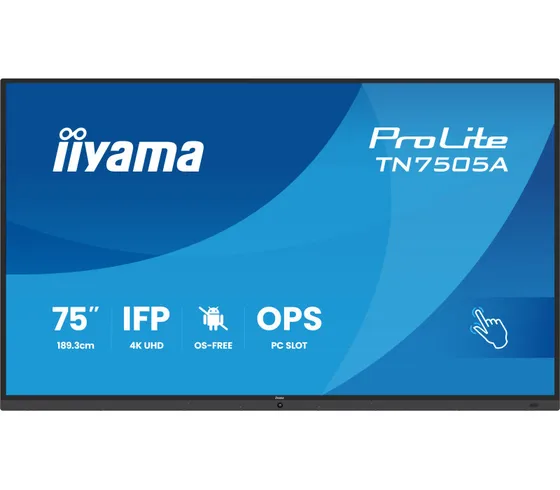
iiyama 75″ touchscreen monitor
Brand: iiyamaModel: TN7505A-B1AG
BlackMultiTouch
View details →
unitsunits


Give visitors a large interactive screen where they can explore your range at their own pace. The 86-inch iiyama ProLite TN8605A-B1AG displays detailed visuals, product catalogues and multimedia apps in 4K UHD. Precise DeepContrast-IR+ touch control makes it easy for customers to browse the content themselves, compare products and discover what your brand offers.
At trade shows, the 86″ screen works well for product configurators, demonstrations and information points. At conferences, congresses and workshops, presenters can explore complex designs and annotate the image as they speak. The screen gives them ample room to work while keeping the presentation visible to a larger group.
The iiyama TN8605A-B1AG runs from your choice of computer and software. With no built-in operating system, you control the setup, from specialist configurators to apps and materials created for the event. High brightness and an anti-glare surface help people see the content clearly. USB-C carries video and touch data and can charge a compatible laptop through the same connection.
01 / FEATURES AND APPLICATIONS
A well-designed presentation can draw visitors into an exhibition stand more effectively than a printed catalogue or static display. An 86-inch touchscreen gives them a clear view of the range and the freedom to explore the products themselves.
Use the 86″ iiyama display for interactive catalogues, 3D visualisations, product models and custom configurators. Visitors can choose variants, zoom in on details and compare options directly on screen.
At a motor show, visitors can explore vehicle equipment and colours. At an industrial exhibition, the screen can show machines, production systems and diagrams of how equipment works. Its large format keeps details visible together that would need to be enlarged on a smaller screen.
Renting a touchscreen for your exhibition stand gives visitors a reason to stop and explore, and gives your sales team a practical tool for product demonstrations.
A touchscreen brings a conference presentation beyond a sequence of slides. The presenter can work directly on the image, point out key details and add notes while speaking.
The 86-inch iiyama touchscreen has room for charts, technical documents, designs and multimedia. Its 4K UHD resolution keeps fine details visible, and precise touch control makes them easier to discuss and analyse.
For workshops and project meetings, the screen can serve as an interactive whiteboard. Participants can develop ideas together, mark up options and work directly with the materials. Connect a suitable computer and app to create a shared workspace.
Large touchscreen rental is particularly useful when participants need to take an active part, see the material clearly and discuss it as it appears.
The large screen gives photos, video, visualisations and complex graphics room to breathe. The iiyama TN8605A-B1AG displays 3840 × 2160 pixels, keeping fine details visible even on information-rich slides.
The IPS panel offers wide viewing angles, so people can see the image from the sides of a room or stand. High brightness helps in well-lit venues, while the AG anti-glare coating reduces distracting reflections.
Optical Bonding brings the touch surface closer to the displayed image. Combined with DeepContrast-IR+, it makes touch input feel direct and accurate, with touch accuracy of up to ±1 mm.
Palm Rejection reduces unintended input when you rest your hand on the screen. It makes note-taking, pointing out detail and working in apps more comfortable during longer presentations and workshops.
A built-in Android system is not essential for every presentation. If your project uses a dedicated app, specialist software or a company computer, control over the working environment can be more useful.
The iiyama TN8605A-B1AG has no built-in operating system. It connects to an external computer, so you can use your preferred operating system and applications and follow your organisation’s IT security policies.
This is particularly useful for confidential project presentations, business meetings and events where companies or institutions rely on their own IT infrastructure.
The monitor has HDMI, DisplayPort and USB-C inputs. A USB-C connection carries video, data and touch input, and charges a compatible laptop at up to 65 W. The OPS slot can accommodate a compatible computer module if you prefer to keep a separate computer off the stand.
The same large touchscreen can play different roles. Exhibition visitors can browse your range independently, conference speakers can lead presentations and discussions, and guests at promotional events can use custom apps and interactive content.
Connecting an external computer lets you use the exhibitor’s or organiser’s software. The screen works for straightforward multimedia presentations as well as more demanding applications that need extra processing power.
CMP can help you select the computer, mounting arrangement and connections to suit the venue and the way you plan to use the display.
You can also choose from our touchscreen monitors in other sizes to suit the space on your stand, the number of attendees and how they’ll use the presentation.
02 / TECHNICAL SPECIFICATIONS
| Manufacturer | iiyama |
|---|---|
| Series | ProLite |
| Model | TN8605A-B1AG |
| Device type | Large-format touchscreen with no built-in operating system |
| Nominal screen size | 86″ |
| Actual screen size | 85.6″ / 217.4 cm |
| Panel technology | IPS LCD |
| Resolution | 3840 × 2160 px — 4K UHD |
| Aspect ratio | 16:9 |
| Panel brightness | 500 cd/m² |
| Display brightness | 450 cd/m² |
| Static contrast ratio | 1200:1 |
| Panel response time | 8 ms GTG |
| Viewing angles | 178° / 178° |
| Active display area | 1895 × 1066 mm |
| Pixel pitch | 0.4935 mm |
| Touch technology | DeepContrast-IR+ |
| Touch points | 40 |
| Touch accuracy | ±1 mm |
| Touch interface | USB |
| Palm Rejection | Yes |
| Screen coating | AG anti-glare and antibacterial coating |
| Touch glass | Optical Bonding, Anti-Glare, Anti-Gloss |
| Operating system | No built-in operating system |
| Compatible operating systems | Windows, Linux |
| HDMI inputs | 2 × HDMI (CEC/ARC) |
| DisplayPort | 1 × DisplayPort |
| USB-C | 1 × USB-C — DisplayPort Alt Mode, data, touch and 65 W Power Delivery |
| USB Touch | USB-B — touch input for external video sources |
| VGA | 1 × VGA (Full HD) |
| USB-A ports | 2 × USB 3.2 Gen 1, 1 × USB 2.0 |
| Wired network | 2 × RJ45 (in/out) |
| Control | RS-232C / LAN |
| OPS | Intel OPS80 slot |
| PiP — picture-in-picture | Yes |
| PbP — picture-by-picture | Yes |
| Built-in speakers | 2 × 20 W |
| Subwoofer | 1 × 20 W |
| Fanless design | Yes |
| Operating orientation | Landscape only |
| VESA mounting pattern | 800 × 600 mm |
| Monitor dimensions | 1955.9 × 1174.3 × 120.6 mm |
| Monitor weight | 66.4 kg |
| Power consumption | 225 W typical |
| Operating temperature | 0–40°C |
| Energy efficiency class | G |
| Housing colour | Black |
03 / CONFIGURATION AND INSTALLATION
An 86-inch touchscreen gives you a large interactive display in a smaller space than a 98-inch model. It suits presentation areas, exhibition stands, conferences and workshops.
The iiyama TN8605A-B1AG weighs 66.4 kg and uses a VESA 800 × 600 mm mounting pattern. We select a stand, bracket or supporting structure to suit the weight, keep the installation stable and accommodate the way participants will use the screen.
When planning the stand, we agree on the mounting height and allow access to the connections, power supply and service space. This monitor is designed for landscape use only. It is unsuitable for portrait installations or use as a touch table.
The iiyama TN8605A-B1AG connects to an external computer that runs your presentations, product configurators and interactive apps.
USB-C carries video, data and touch input, and can charge a compatible laptop at up to 65 W. This reduces cabling and simplifies the presentation setup.
If you use HDMI, DisplayPort or VGA for the picture, touch control requires a separate USB Touch connection to the computer.
When our agreed scope includes technical support, we check the connections before the event to make sure the equipment works with your application.
The TN8605A-B1AG has no built-in operating system. The connected computer can run all the apps you need, giving you a choice of operating environment.
At a trade show, you can use custom configurators and interactive catalogues. At a conference, you can run the presentation apps and software your speakers already use.
A compatible OPS computer can also be fitted to the monitor, creating an integrated setup without a separate computer on the stand.
The right computer and software depend on the presentation and how people will use the screen.
When planning an 86″ touchscreen installation, consider both the audience’s view and how easily users can reach the whole screen.
On an exhibition stand, we consider visitor space, mounting height and access to the app’s interactive controls. For conferences and workshops, we also consider where the presenter will stand and whether the rest of the audience can read the screen.
Prepare multimedia and app interfaces for a resolution of 3840 × 2160 pixels. Size buttons, menus and selection fields so people can find and tap them easily.
For installations with more than one signal source, PiP and PbP let you display two images at once.
We agree the scope around the event, the way you plan to use the screen and the technical resources your team has available.
You can collect your touchscreen from CMP’s warehouse in Piła, arrange delivery and collection, or rent it with installation and full technical support within the agreed scope.
We can arrange transport and a suitable mount, install the monitor, connect the computer and start your presentation. Depending on the project, we can also configure the setup for your own applications.
If you have your own technical crew, you can rent the monitor and agreed accessories for your team to install and operate.
04 / QUESTIONS AND ANSWERS
The monitor is well suited to trade shows, conferences, congresses, workshops and business presentations. The large 4K UHD display gives you space for detailed content and interactive apps.
Yes. DeepContrast-IR+ supports multi-touch input, so several people can work together in compatible apps.
No. The iiyama TN8605A-B1AG has no built-in operating system. To run apps and presentations, connect a suitable computer or use a compatible OPS module.
You can use your own computer, operating system and software and retain control over the entire setup. This is particularly useful for corporate presentations and events that rely on internal applications.
Yes. The monitor accepts HDMI, DisplayPort and USB-C. USB-C carries video, data and touch input, and can charge a compatible laptop at up to 65 W.
The TN8605A-B1AG has no built-in Bluetooth or Wi-Fi. A suitably equipped external computer or OPS module can provide wireless connectivity.
The monitor has no built-in wireless presentation system. You can add this capability by connecting a compatible computer or wireless presentation device.
No. The iiyama ProLite TN8605A-B1AG is designed for landscape use only. It should not be installed vertically or upside down.
Yes. Use a compatible stand or structure with a VESA 800 × 600 mm mount rated for the monitor’s weight of 66.4 kg.
Yes. The AG coating reduces reflections, and the IPS panel gives wide viewing angles. The screen also features Optical Bonding and an antibacterial coating.
Yes. The display works with interactive catalogues, configurators and presentation apps running on a connected computer, so you can use software designed for your exhibit.
Yes. Connect compatible signal sources and use PiP or PbP to display both images simultaneously.
Yes. Palm Rejection reduces unintended input when you rest your hand on the screen, making it easier to write and annotate.
Yes. It has two 20 W speakers and a 20 W subwoofer. For larger events, you can use a separate sound system suited to the venue.
We agree the equipment list for each project. A stand, computer, OPS module and other accessories can be included in your quotation to suit your needs.
The price depends on rental duration, event location, transport, mounting arrangement, additional equipment and the technical support you need.
Tell us the event dates and venue, how people will use the screen and whether it will be freestanding or mounted within an exhibition structure. If you plan to run an interactive app, include its requirements so we can select a suitable computer and connection.
Send us your plans, sample content or an early idea. Our specialists will help you choose suitable equipment and plan how to use it.
Ask for help choosing equipment
09 / CONTACT
Planning an event or looking to rent equipment? Get in touch and tell us what you need. We help you choose a setup that suits your project, the available space and your budget. We prepare proposals for full technical event production and quotations for AV equipment rental.Send us your brief and any dates and locations already confirmed. You can also start with a general idea. Together we will work out the details we need to prepare a proposal. Call, email or use the enquiry form.
10 / COMPANY DETAILS
ul. Jana Styki 3
64-920 Piła, Poland
NIP: 7642722129
KRS: 0001128230
REGON: 529696130
District Court Poznań – Nowe Miasto and Wilda in Poznań
IX Commercial Division of the National Court Register