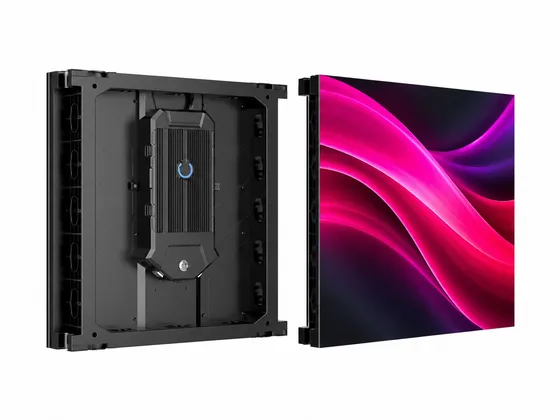
P2.6 flat LED screen
Brand: YES TECHModel: MG6S P2.6Application: Indoors
View details →
m²In 0.25 m² increments · max. 500 m²m²


Run the picture seamlessly around the corner of an exhibition stand or set and catch the eye from two directions at once. The YES TECH MG6S P2.6 corner LED screen joins two adjacent walls at 90° to create one continuous surface for animations, logos and video. The two screens read as a single, striking three-dimensional installation.
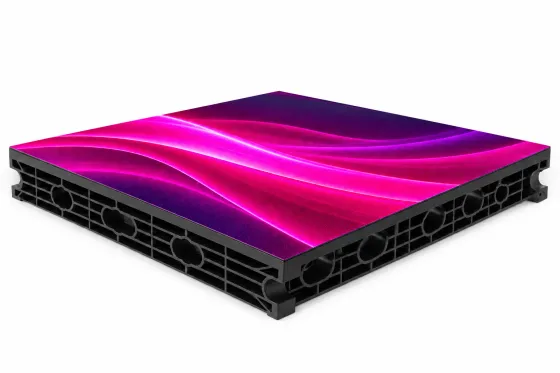
The edges of the corner cabinets are bevelled at 45°, allowing two planes to meet at a right angle with a neat joint finish. The 500 × 500 × 73 mm polymer cabinets, each with an area of 0.25 m², can form L- and U-shaped layouts. Suitable connectors also allow them to be joined flat in a single line.
The 2.60 mm pixel pitch keeps presentations, text and fast-moving video clear at short and medium viewing distances. Modular cabinets let you adapt the width of both sides and the installation height to the stand design. Front and rear service access helps when working in an exhibition stand or stage set.
01 / FEATURES AND APPLICATIONS
The corner P2.6 LED screen allows the corner of an exhibition stand or set to be used as an active display surface. The image continues from one wall to the other at an angle of 90°, strengthening the three-dimensional impression of the complete structure.
This setup catches the attention of visitors approaching along different aisles. It creates one continuous display around the corner in place of two separate screens.
The YES TECH MG6S corner cabinet has edges bevelled at 45°, allowing two adjacent planes to meet at 90° with a neat edge finish.
The cabinets can be configured in L- and U-shaped layouts to create a single corner or a three-wall enclosure. Suitable connectors also allow them to be joined flat as part of a straight wall section.
The 2.60 mm pixel pitch suits indoor stands and stages seen from short and medium viewing distances.
Product presentations, brand graphics, text and video stay crisp across both sides of the corner.
The polymer cabinet measures 500 × 500 × 73 mm and covers 0.25 m², making it easy to plan the height and width of a modular installation.
Front and rear service access facilitates technical support within an exhibition stand or stage structure, while retaining space for ventilation and cables.
Choose the P2.6 Corner to continue the image around a 90° corner in an L or U shape at the edge of a stand or stage set.
For a classic flat wall or curve, choose P2.6 Regular; for a structure visible from all four sides, choose P2.6 Four-Sided. If viewers will stand very close to the screen and require an even finer pixel pitch, consider the P1.9 Corner or P1.5 Corner model.
02 / TECHNICAL SPECIFICATIONS
| Brand | YES TECH |
|---|---|
| Model | MG6S P2.6 Corner |
| Applications | Indoor use |
| Cabinet construction | Polymer |
| Pixel pitch | 2.60 mm |
| Cabinet dimensions | 500 × 500 × 73 mm |
| Cabinet area | 0.25 m² |
| Corner angle | 90° |
| Cabinet edges | Bevelled at 45° |
| Configuration options | L-shaped, U-shaped and flat configurations with suitable connectors |
| Service access | Front and rear |
The YES TECH MG6S corner P2.6 LED screen uses 500 × 500 × 73 mm polymer cabinets (0.25 m²) with edges bevelled at 45°, allowing 90° corners to be built in L- and U-shaped layouts and flat connections to be made using the appropriate connectors.
We tailor the final dimensions of both corner sections, the resolution of the complete installation, the video processor and the supporting structure or suspension system to the stand or stage design.
03 / CONFIGURATION AND OPERATION
The 500 × 500 × 73 mm cabinets allow the lengths of both sides of an L-shaped corner or all three planes of a U-shaped layout to be planned precisely.
With suitable connectors, the corner cabinets can also be joined flat, making it easier to incorporate them into a longer stand wall or set.
We control the entire corner installation from a single image control system, selecting the video processor to match the installation's total resolution and the type of source signal.
Before the event, we provide the exact pixel grid for both walls and guidance for preparing animations so that the picture flows naturally across the 90° corner.
The P2.6 Corner creates 90° corners in L- and U-shaped layouts and lets the image flow seamlessly where two stand walls meet.
If you are planning a straight wall or a concave or convex curve, see the P2.6 regular LED screen. If the installation is to create an enclosed form visible from four sides, see the four-sided P2.6 LED screen.
We tailor the rental to the installation schedule and your team’s technical resources.
Collect the prepared equipment from our warehouse in Piła, book hire with delivery and collection, or choose full technical support to an agreed scope, including the structure, installation, video processor setup and operator support.
04 / QUESTIONS AND ANSWERS
The corner P2.6 LED screen allows one continuous image to run around the 90° corner of a stand or set. The message is therefore visible from two directions at the same time and forms a three-dimensional structure.
Cabinets with edges bevelled at 45° can form 90° corners in an L-shaped layout and three-wall enclosures in a U-shaped layout. Suitable connectors also allow them to be joined flat.
Each cabinet measures 500 × 500 × 73 mm and covers 0.25 m². It has a 2.60 mm pixel pitch and a polymer housing.
Yes. The YES TECH MG6S P2.6 Corner model provides front and rear service access, making it easier to maintain in a built-in installation provided there is space for ventilation and cabling.
No. This screen is designed for indoor use only, in exhibition halls, conference centres and event venues.
Content is prepared for the combined resolution of all the walls forming the L-shaped or U-shaped layout. Once the screen dimensions have been agreed, we provide an exact pixel map and file guidelines.
P2.6 Corner creates open 90° corners in L- or U-shaped layouts at the edge of the stand. The four-sided P2.6 forms an enclosed display visible from all four sides.
The price depends on the number of cabinets and the total area in m², the installation layout, the rental period, the event location and the selected scope of technical support.
You can collect from the CMP warehouse in Piła, hire with delivery and collection, or book full technical production with the structure, installation and operator support as agreed.
Send us the event date and venue, planned layout (L or U), dimensions of each wall and mounting details. Attach a stand plan or visualisation to your enquiry if you have one.
Send us a design, sample content or an initial idea. Our specialists will help you choose the screen and plan how to use it.
Ask for help choosing equipment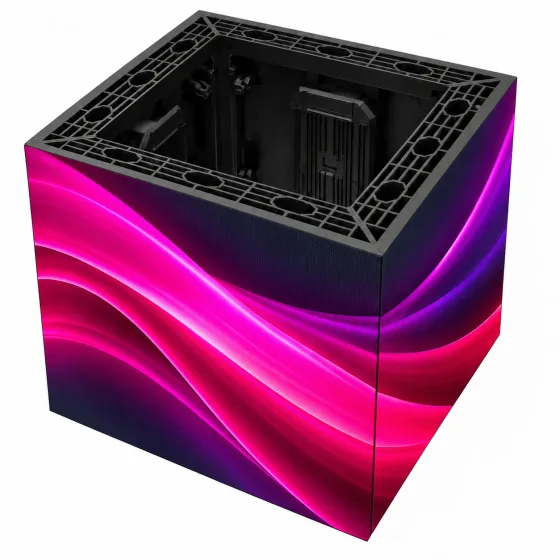
09 / CONTACT
Planning an event or looking to rent equipment? Get in touch and tell us what you need. We help you choose a setup that suits your project, the available space and your budget. We prepare proposals for full technical event production and quotations for AV equipment rental.Send us your brief and any dates and locations already confirmed. You can also start with a general idea. Together we will work out the details we need to prepare a proposal. Call, email or use the enquiry form.
10 / COMPANY DETAILS
ul. Jana Styki 3
64-920 Piła, Poland
NIP: 7642722129
KRS: 0001128230
REGON: 529696130
District Court Poznań – Nowe Miasto and Wilda in Poznań
IX Commercial Division of the National Court Register