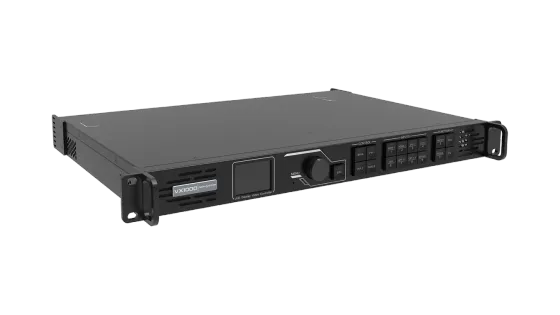
NovaStar VX1000
Brand: NovaStarModel: VX1000
Type: All-in-one LED processor / controllerCapacity: up to 6 500 000 pixelsLED outputs: 10 × Gigabit Ethernet
View details →
unitsunits


Show an SDI feed on a display with an HDMI input. The Blackmagic Design converter helps you preview a camera or video mixer feed on a suitable TV or monitor. This lets the presenter, operator or guests see the feed where they need it.
01 / FEATURES AND APPLICATIONS
An additional screen can be used to monitor the programme, check the framing or send the video to another area. The converter helps connect devices that perform different tasks and use different signal interfaces.
Plan the video route from the production desk to the display. We’ll agree the signal map and connected devices.
Connect sources and displays in the configuration your exhibition stand needs. The design takes account of resolutions, distances and access to the equipment.
Add the processing or transmission function your installation needs. Checking compatibility in advance helps you put together a complete system.
02 / TECHNICAL SPECIFICATIONS
| Manufacturer | Blackmagic Design |
|---|---|
| Enquiry unit | units |
The specifications apply to the indicated model. We confirm the equipment supplied in the set and its compatibility with other devices during selection.
03 / CONFIGURATION AND INSTALLATION
The unit converts SDI to HDMI. We select the model to match the source format and the screen’s capabilities. We also check the frame rate, connections and power so both ends of the signal path use a compatible signal.
Tell us which devices are at each end. We check signal direction, resolution, refresh rate, connectors and distance. Some converters do not scale the picture, and processor capabilities depend on the setup.
You can hire the equipment for collection in Piła, hire it with delivery and collection, or book full technical production. The agreed quote itemises equipment, transport, preparation and crew support.
Tell us what equipment you already have and send us your event plan. We’ll choose the components needed to use this product with your setup and confirm individual equipment availability and the service scope for your dates.
Include the date, location and quantity in your enquiry. Also describe the source, receiver, video format and signal-route length.
04 / QUESTIONS AND ANSWERS
For an enquiry about Blackmagic Design SDI → HDMI converter, please give the quantity, dates and location. Specify the source, receiving device, video format and signal cable run length. We will use these details to check the equipment selection and prepare a quotation.
Tell us which devices are at each end. We check signal direction, resolution, refresh rate, connectors and distance. Some converters do not scale the picture, and processor capabilities depend on the setup.
Yes. Include the address, dates and access conditions in your enquiry. The quote will cover transport in both directions. We will agree on the installation, configuration and operation you need.
We specify the scope in the quote. We confirm the equipment list and agree accessories, preparation, and technician or operator time separately.
No. An enquiry lets us check the dates, availability and configuration. We confirm the booking and terms once we’ve agreed the quote.
Send us your plans, sample content or an early idea. Our specialists will help you choose suitable equipment and plan how to use it.
Ask for help choosing equipment

09 / CONTACT
Planning an event or looking to rent equipment? Get in touch and tell us what you need. We help you choose a setup that suits your project, the available space and your budget. We prepare proposals for full technical event production and quotations for AV equipment rental.Send us your brief and any dates and locations already confirmed. You can also start with a general idea. Together we will work out the details we need to prepare a proposal. Call, email or use the enquiry form.
10 / COMPANY DETAILS
ul. Jana Styki 3
64-920 Piła, Poland
NIP: 7642722129
KRS: 0001128230
REGON: 529696130
District Court Poznań – Nowe Miasto and Wilda in Poznań
IX Commercial Division of the National Court Register