
Apple iPad A16 tablet
Brand: AppleModel: iPad (A16)
Display protection: additional protective glass over the screenProcessor: Apple A162360 × 1640
View details →
unitsunits

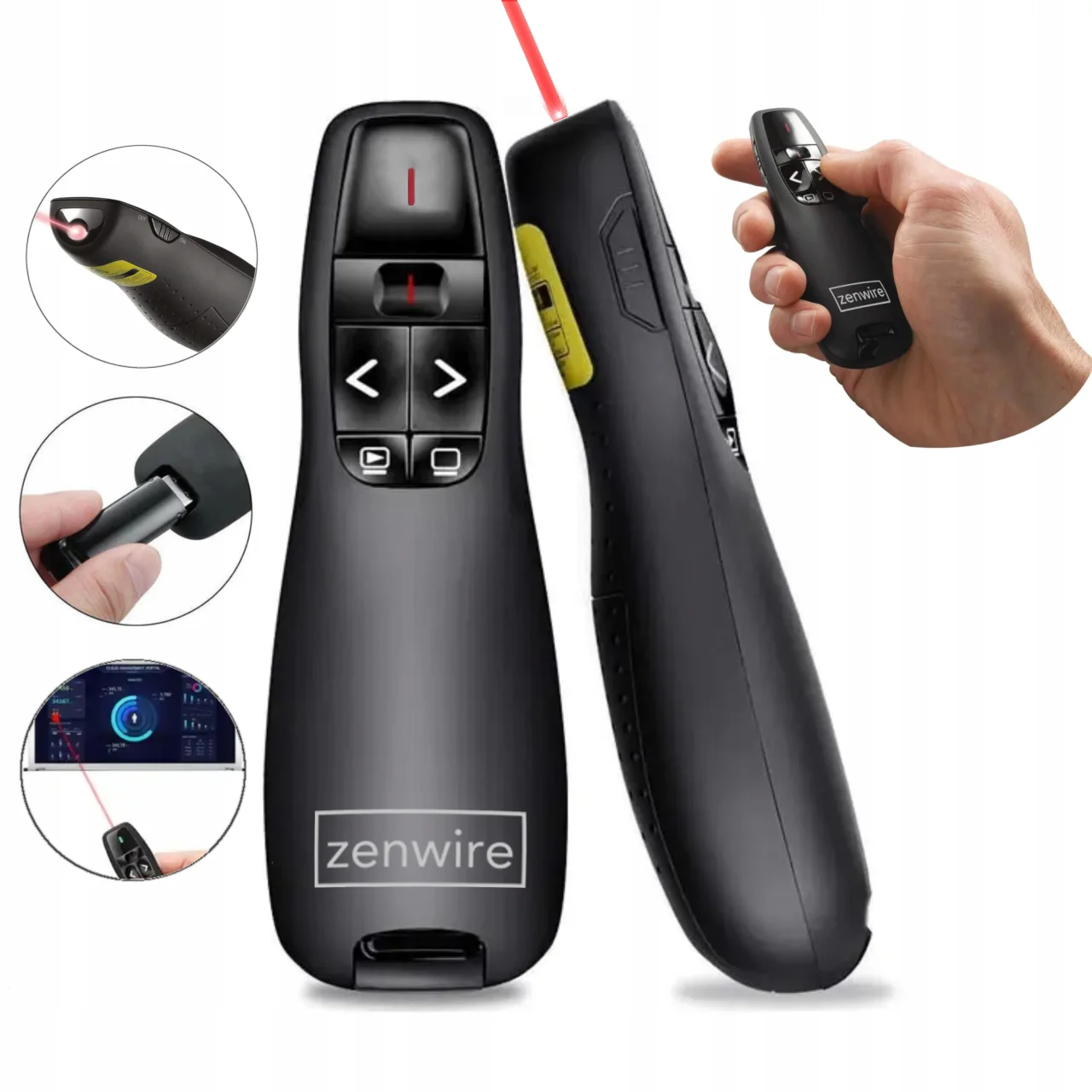
Present from wherever you can best connect with your audience. The Zenwire S15 lets you change slides, start the slideshow and blank the screen wirelessly. The red laser pointer helps highlight details on a suitable projection surface, and the remote fits comfortably in your hand.
01 / FEATURES AND APPLICATIONS
Switch slides without returning to the laptop and keep your presentation moving. A presentation remote lets you move around the stage and focus on your audience at a conference, training session or product demonstration.
Plan to use the device as part of a demonstration setup. We agree the required apps, additional equipment and connections for the project.
Include the equipment in your playback and presentation plan. How you use it depends on the device and software.
Select the component for the existing workstation. We check the system, connections and software requirements.
02 / TECHNICAL SPECIFICATIONS
| Model | S15 |
|---|---|
| Manufacturer | Zenwire |
| Connection | Wireless, USB-A receiver |
| Operation | Plug & Play |
| Button functions | Laser, previous/next slide, slide show, black screen |
| Laser colour | Red |
| Power supply | 2 × AAA 1.5 V |
| Dimensions | 115 × 40 × 30 mm |
| Receiver storage | Inside the remote control |
| Enquiry unit | units |
The specifications apply to the indicated model. We confirm the equipment supplied in the set and its compatibility with other devices during selection.
03 / CONFIGURATION AND INSTALLATION
We connect the USB-A receiver to the computer and test the buttons in the application you’ll use. The receiver fits inside the casing for easy storage. We check how well the laser shows up on the actual surface, particularly on electronic displays.
Send us the software requirements and a list of connected devices. We’ll confirm the setup, licences, connections and any internet access required. Paid applications are only included if agreed as part of the hire.
You can hire the equipment for collection in Piła, hire it with delivery and collection, or book full technical production. The agreed quote itemises equipment, transport, preparation and crew support.
Tell us what equipment you already have and send us your event plan. We’ll choose the components needed to use this product with your setup and confirm individual equipment availability and the service scope for your dates.
Include the date, location and quantity in your enquiry. Also describe the application requirements, content types and connected devices.
04 / QUESTIONS AND ANSWERS
For an enquiry about Wireless presentation remote with red laser — S15, please give the quantity, dates and location. Specify the application requirements, type of content and equipment you will connect. We will use these details to check the equipment selection and prepare a quotation.
Send us the software requirements and a list of connected devices. We’ll confirm the setup, licences, connections and any internet access required. Paid applications are only included if agreed as part of the hire.
Yes. Include the address, dates and access conditions in your enquiry. The quote will cover transport in both directions. We will agree on the installation, configuration and operation you need.
We specify the scope in the quote. We confirm the equipment list and agree accessories, preparation, and technician or operator time separately.
No. An enquiry lets us check the dates, availability and configuration. We confirm the booking and terms once we’ve agreed the quote.
Send us your plans, sample content or an early idea. Our specialists will help you choose suitable equipment and plan how to use it.
Ask for help choosing equipment

09 / CONTACT
Planning an event or looking to rent equipment? Get in touch and tell us what you need. We help you choose a setup that suits your project, the available space and your budget. We prepare proposals for full technical event production and quotations for AV equipment rental.Send us your brief and any dates and locations already confirmed. You can also start with a general idea. Together we will work out the details we need to prepare a proposal. Call, email or use the enquiry form.
10 / COMPANY DETAILS
ul. Jana Styki 3
64-920 Piła, Poland
NIP: 7642722129
KRS: 0001128230
REGON: 529696130
District Court Poznań – Nowe Miasto and Wilda in Poznań
IX Commercial Division of the National Court Register